
Open beta For facilitators who work on real walls

Photograph the wall.
Have the conversation.

Tables photograph their post-its. Every note lands on the screen in its table's colour, and the room sorts, questions and votes from their phones. You drive it from yours.

No wall at hand? The demo is a room of its own with three photographed walls and a few invented people. No email needed.

Free during the beta, until 11 Dec 2026every note keeps its table's colourvotes counted, never generated
From the wall to the wall

One photo. Six notes. Nothing retyped.

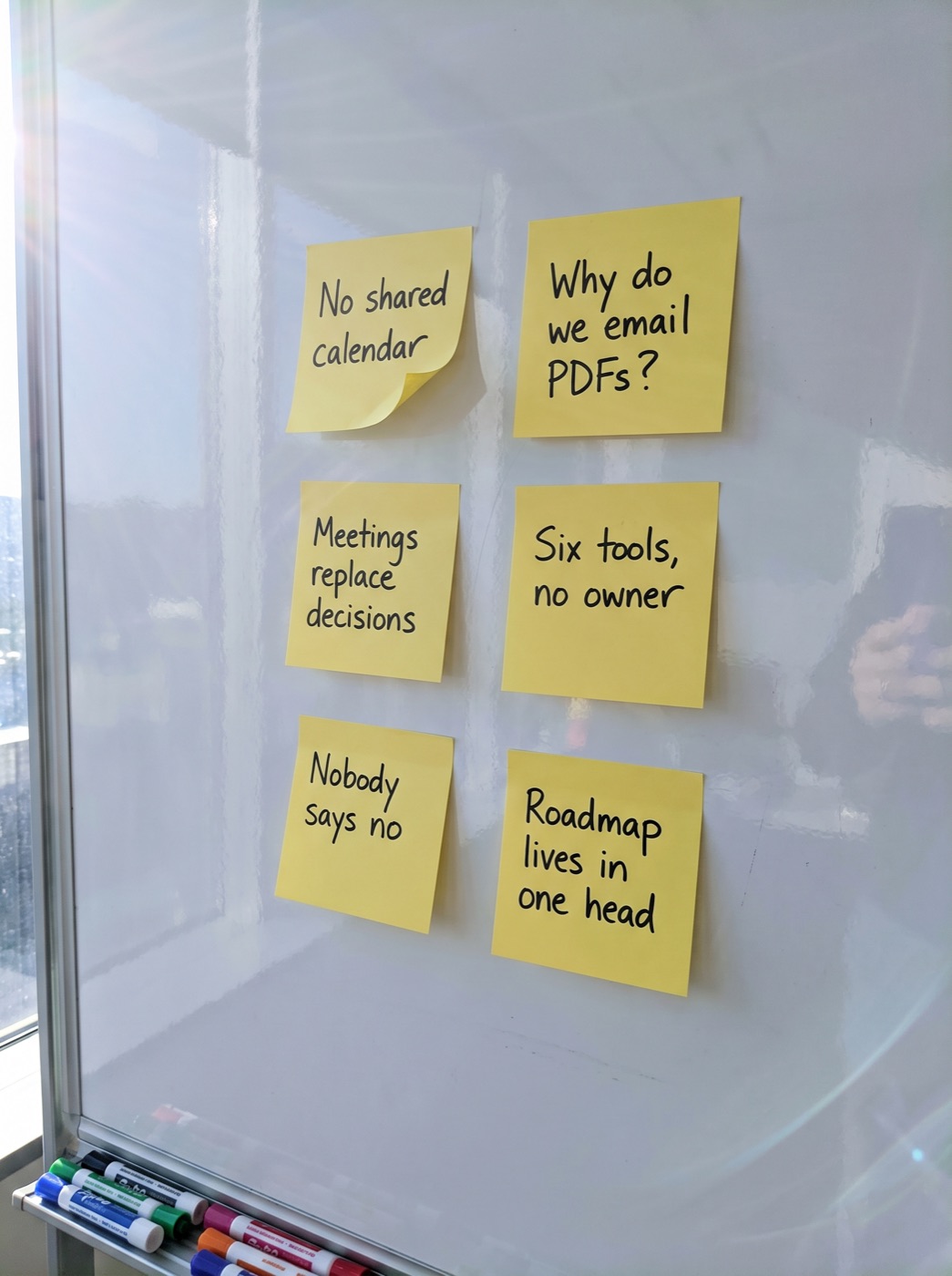
A table photographs its corner of the wall with whatever phone is on the table. Every note is found, read and placed in that table's column on the screen, in its own words. What it cannot read stays a photo until the table types it.

A phone photo of six yellow post-its on a whiteboard
Table 1 · SamPhoto taken
read on the server
The photo is a phone photo of a real-size wall. The notes on the right are what the room sees: typed, in Table 1's colour, in the order they hung.
0minutes reading aloud

Every note read. Not read out.

One photo per table. Sixty notes are on the screen, in their own words and their table's colour, before you have put the marker down.

1lens becomes any lens

Sorted in the open, while you talk.

Clusters appear as a draft the whole room can see and change. Say a different grouping out loud and the wall re-sorts in half a second.

3dots per person

The room decides. You hold the conversation.

Participants sort and vote from their own phones. You stop being the person at the wall and start running the discussion.

How it works

You tap. The screen changes. Every phone follows.

Scroll through a session. The Director app on your phone sets what the beamer shows and what every participant is asked to do on theirs. No laptop, no clicker, no one standing at the wall.

Photograph the wall.

One phone per table takes one photo. Every note is read on the server and lands in its table's column as the photo arrives. Nothing is retyped.

Your phone Capture · 3 tables · 18 notes

Each table checks its notes, and claims them.

Reading happens in parallel. A note it cannot read stays a photo until that table types it; it is never guessed. Wrote your name on a post-it? It is read and offered back to you to confirm. Did not? Tap the notes that are yours. Either way the name on the screen is one a person put there.

Their phones Which of these did you write?

Clusters appear while you are still talking.

The AI drafts a grouping and labels it draft. Participants move their own notes from their phones; the beamer re-sorts as they do. You rename a label with one tap.

Your phone View 3 · Clusters · 11 moves

The room votes. You watch the weight shift.

Three dots each. Clusters re-order by weight as the dots come in. Counted, never generated, and the count stays on the screen for the rest of the day.

Their phones Vote · 31 of 42 dots in

Say a new grouping out loud.

Hold the mic on your phone: "group these by who can fix it". The wall re-sorts. Every question you ask is kept as its own view, so you can switch back to an earlier one.

Your phone Ask AI · "who can fix it?"

Put one note centre stage.

The question in the corner, the odd one out, the note the room keeps coming back to. Spotlight it, ask the room, and the AI's own observations stay in your pocket until you decide to show them.

Your phone Spotlight · Ask the room
Director
On screen nowView 1 · Wall
Capture Check Sort Vote Spotlight Ask AI
Next round
You · Director
Sam · Table 1
Sam · participant
The views

Every view is one more question you can ask of the wall.

Nothing appears, nothing disappears. The same notes travel to a new arrangement in half a second, and the discussion moves with them.

What you keep

Leave with more than a photo of the wall.

The end of the session is usually where the thinking gets flattened into a list. This is what a Metodic Live room hands you instead.

Decisions · 6
Ownership · 6
Tools & data · 5

Clusters, with your labels.

Every note in its cluster, every cluster with the label you settled on, every note still tagged with the table that wrote it.

Votes, per cluster and per table.

Where the room put its dots, and which tables disagreed. A number the room saw itself, not one you reconstructed afterwards.

Sam · 4 notes
Priya · 3 notes
Jonas · 2 notes

Who said what, when they said so.

Names people wrote on their own notes are read; anyone can claim their notes on their phone. Only names people put there themselves. Ask the AI where one person differs from the room.

A draft summary, and the trail behind it.

Tensions, open questions, outliers and a summary marked draft, plus what you noticed in the room and every decision that shaped the wall: what the AI drafted, what the room moved, what you rewrote and asked.

What it never does

The AI is in your pocket, not on the wall.

Rooms trust a screen that shows their own words. Seven rules keep it that way.

  1. 1The notes never change, only the arrangement. Nothing appears from nowhere.
  2. 2Every note keeps its table's colour in every view.
  3. 3A note it cannot read stays a photo. It is never guessed. The table corrects it.
  4. 4Everything AI-made says draft and is editable from your phone.
  5. 5The AI never writes on the screen unprompted. Observations go to you; you decide to show them.
  6. 6Votes are counted, never generated.
  7. 7One thing on screen at a time. No dashboards, no timers, unless you put one there.
Questions facilitators ask

"Doesn't AI strip the human out of the work?"

It would, if it had the last word. Here it has the first. The rest is the room's.

Doesn't AI clustering flatten the nuance?

It does when the AI has the last word. Here it has the first: a draft, labelled draft, that the room re-sorts from their phones and you relabel with a tap. Tensions, outliers and questions get their own views precisely because a keyword cluster hides them.

The real insight is in the room, not in the text.

Agreed. That is why this happens in the room, with the writers present, and not at a desk three days later. And the things the wall does not say, the table that went quiet, the laugh at one note, you note as a moment on your phone in three words. They go into the summary as context the AI would otherwise never have.

Can I justify every decision afterwards?

Better than with a photo of a whiteboard. The trail shows what the AI drafted, which notes the room moved and who moved them, which labels you rewrote, what was voted and what you asked out loud. Copy it into your report.

Is it slower than sorting by hand?

Sorting sixty notes by hand at the wall takes half an hour while twelve people watch. Here the reading takes seconds, the sorting is done by the room on their own phones, and the half hour goes to the conversation. The spatial part still happens: on the real wall, with real post-its, before any photo is taken.

What about names and privacy?

A name appears only if someone wrote it on their own note or claimed the note on their phone. Anything the AI observes about a person goes to your phone, never to the screen. Photos are read on the server and deleted after the session unless you keep them.

What does it cost?

Nothing during the beta, which runs until 11 December 2026: every room, every photo, every question, no card. After the beta, Metodic Live comes with Metodic Professional and up, and a room draws on the same credits as the rest of Metodic. What a room costs in credits we will set on what the beta rooms actually used, and we will tell the beta group first.

Do participants need an account or an app?

No. They go to metodic.live/join and type the code on the screen. You need an email address; a free Metodic account comes with it, so today's wall can become a full session design later.

On its own, or with Metodic

Bring a question. Or bring a whole session.

Standalone

Type the question on the wall. Go live.

Set tables and colours, share the code, start photographing. You get a Metodic account on the way in, so today's wall can become a full session design later. Nothing to migrate.

  • Two minutes from your phone
  • Participants: no app, no account
  • Room open for 36 hours
Linked to Metodic

Your session design drives the room.

Sign in, pick the session. Every activity brings its question, its clustering lens and its timing. "Next round" on your phone moves the whole room.

  • One room, every activity of the agenda
  • Lenses drafted from the session design
  • Results land back in the session
What would we stop doing?
Nobody says no
Open beta

Your next workshop has a wall. Run it with us in the beta.

Metodic Live is in open beta until 11 December 2026: free for everyone, no card, and we are still shaping it with the facilitators who use it. After that it comes with Metodic Professional and up. Start a room today, or leave your email and we will send you what changes and ask how your room went.

You are in. We will write when something changes, and ask how your first room went. Start one whenever you like.
Start a room nowTry the demo first Starting a room also puts you in the beta group. Participant? Go to metodic.live/join and type the code on the screen.